顯示包含「Color Gamut」標籤的文章。顯示所有文章

Studying "Spectral Primary Decomposition"

Introduction

It has been a long time since my blog post (because of Covid, work, Elden Ring...). So I decided to study the "Spectral Primary Decomposition for rendering with sRGB Reflectance", which used in previous posts, to recall my memory. It is an efficient technique to up-sample sRGB texture to spectral reflectance by multiplying the sRGB values with 3 precomputed basis functions:

Overview of "Spectral Primary Decomposition" from the Explanatory Poster
In this post, I would like to find an efficient spectral up-sampling method which also support wider gamut (e.g. Display-P3...) or investigate why this technique does not support wider gamut.


Porting to Octave

In the paper, it provides sample source code written in Matlab. Since I do not have a Matlab license, so the first thing I need to do is to port the source code to the open source Octave (ported source code can be found here). During the porting process, the fmincon() used for finding the 3 spectral primary basis functions in Octave does not work, so I switched to use sqp() instead (also removed the linprog() from original source code).

Basis Functions generated in Octave

The resulting graph is not as smooth as the original paper. So I decided to try different initial value for the objective function. I chose a normalized Color Matching Function:

Basis Functions generated with normalized CMF initial value
Code for generating normalized CMF initial value

The resulting curves look smoother with normalized CMF as initial value. Also, during the porting process, I switched to use CMF2006 2 degree observer instead of CMF1931 / 2006 10 degree observer used in original source code.


Working with wider gamut

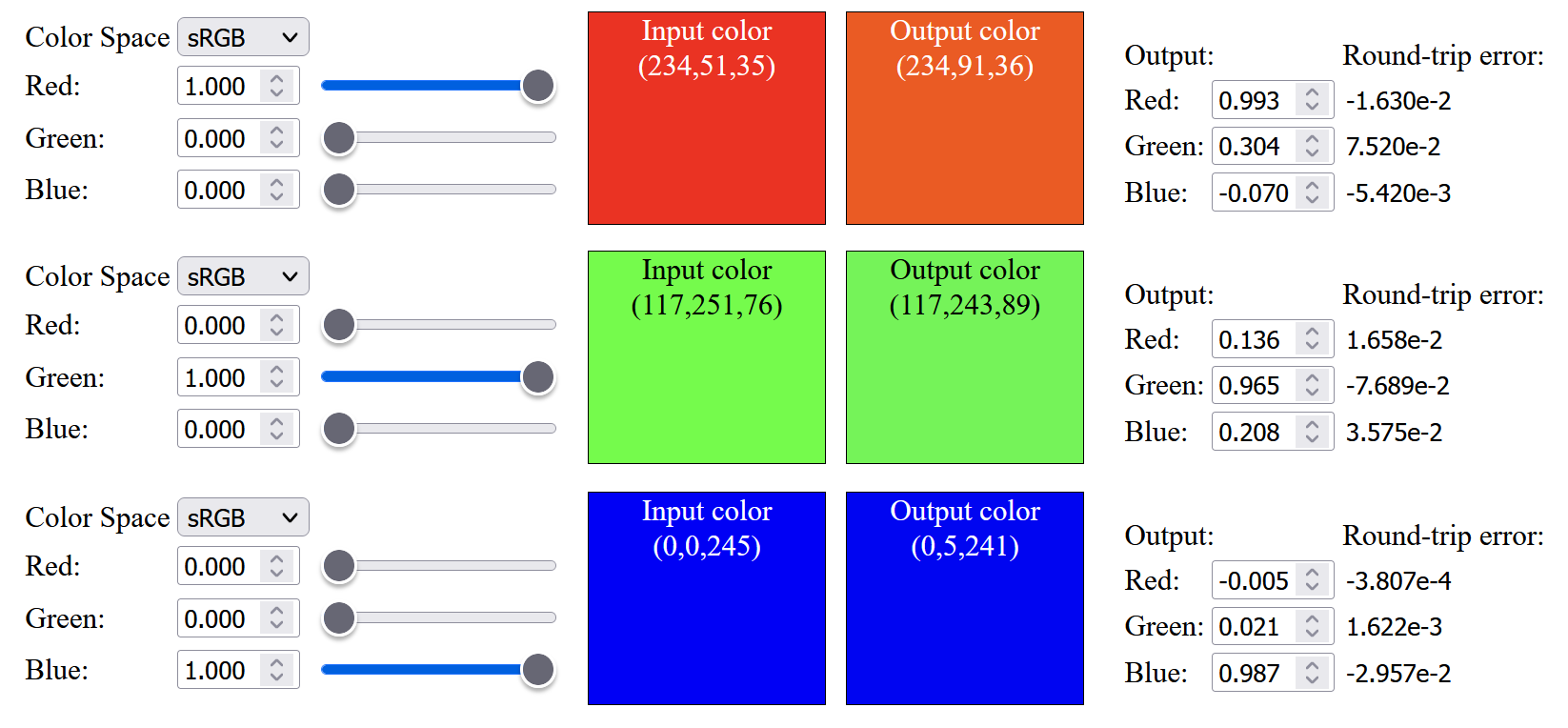
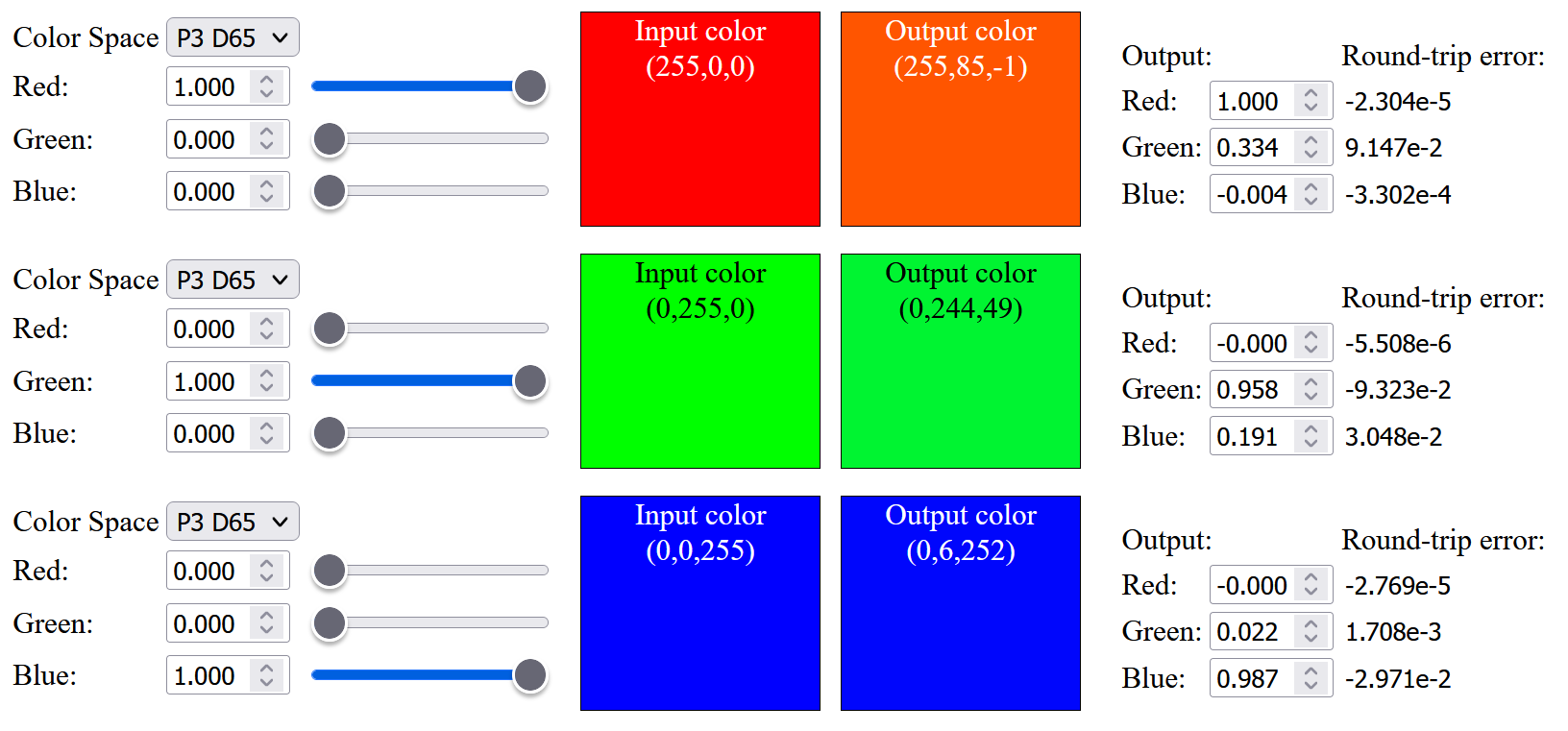
So the next step is to change the color primaries from sRGB to Display-P3 (which the original source listed as infeasible). As expected, the result is not good, not only saturated color cannot be up-sampled, the color within the sRGB gamut are not similar to the original color, and saturated red color will have an orange tint after up-sampling: (Note that below images have Display-P3 color profile attached, to view those saturated color outside sRGB gamut, a wide gamut monitor is needed)

Up-sampled saturated sRGB color
Up-sampled saturated P3 color

So, I tried to modify the objective function opt_fn() used in sqp() to include a weight to minimize the sRGB primaries color difference:

Code snippet of the objective function with sRGB primaries weight

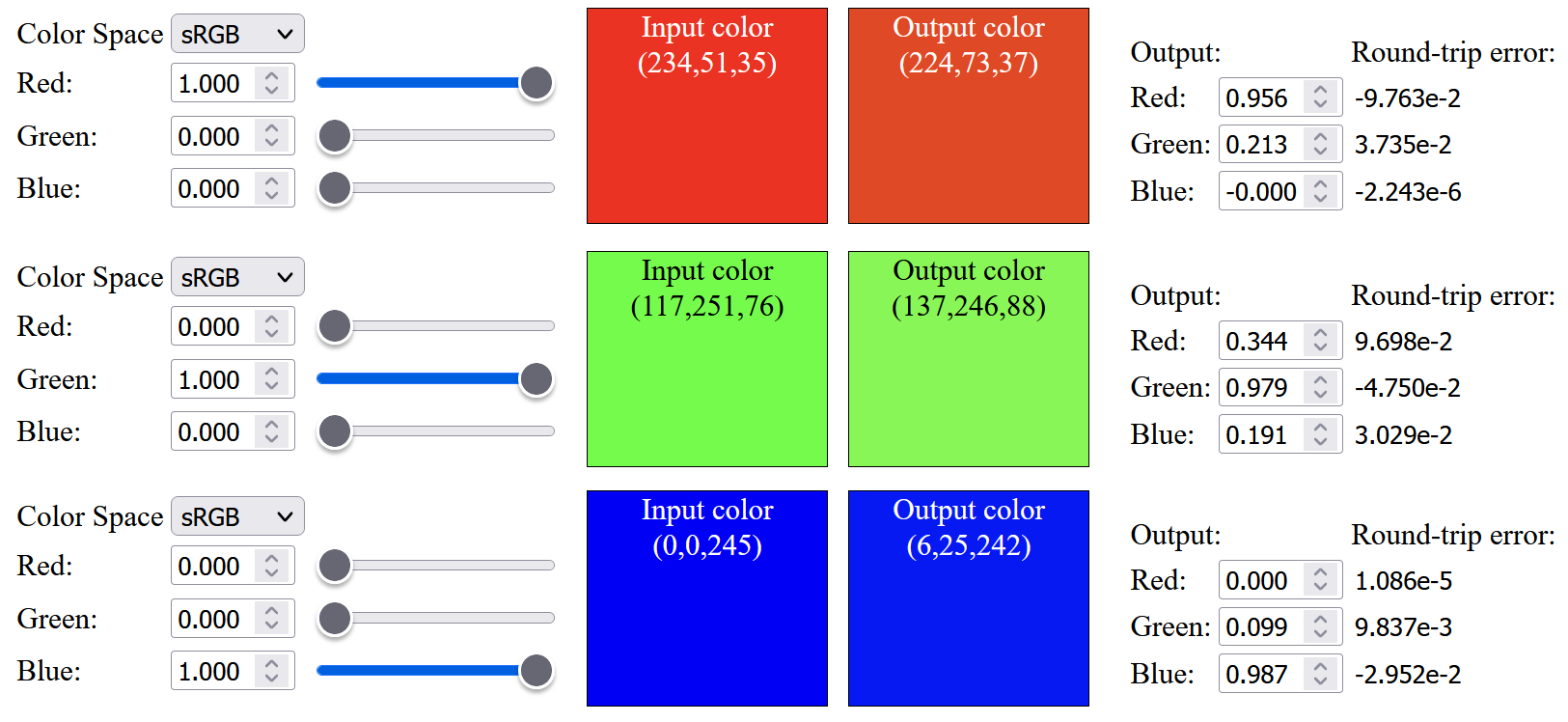
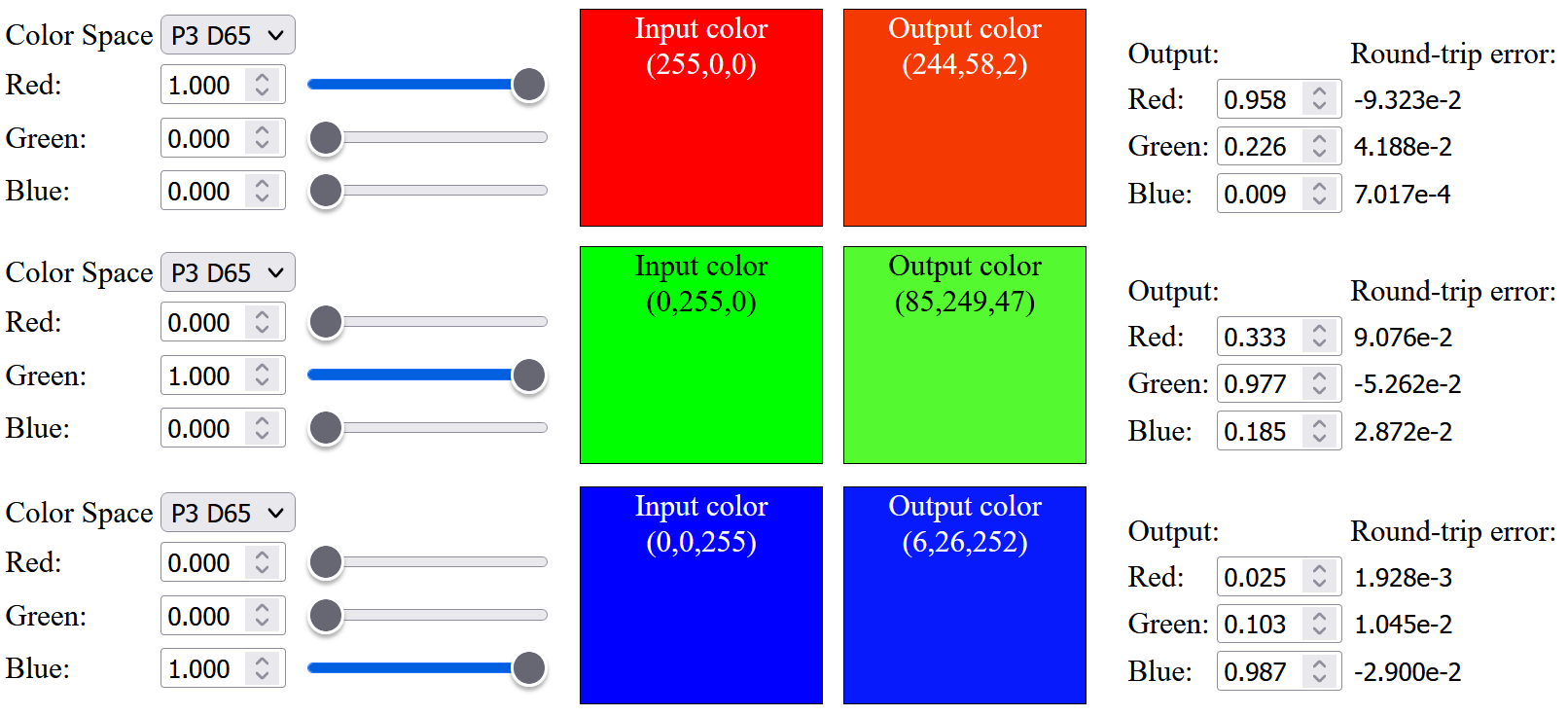
The result improves a bit and the up-sampled saturated red has a less orange tint:

Up-sampled saturated sRGB color with sRGB primaries weight
Up-sampled saturated P3 color with sRGB primaries weight

Up to this point, all the precomputed spectral primary basis functions are within [0, 1] range (i.e. to not reflect more light in each basis function), I was wondering what if we relax this constraint and enforce this limit after linearly combining all the basis functions. I have tried to relax the range of individual basis function to [-0.05, 1.05], [-0.075, 1.075] and [-0.1, 1.1] (details can be found in the visualization website from modified source code). With the relaxed range, we can get very similar sRGB color after up-sampling:
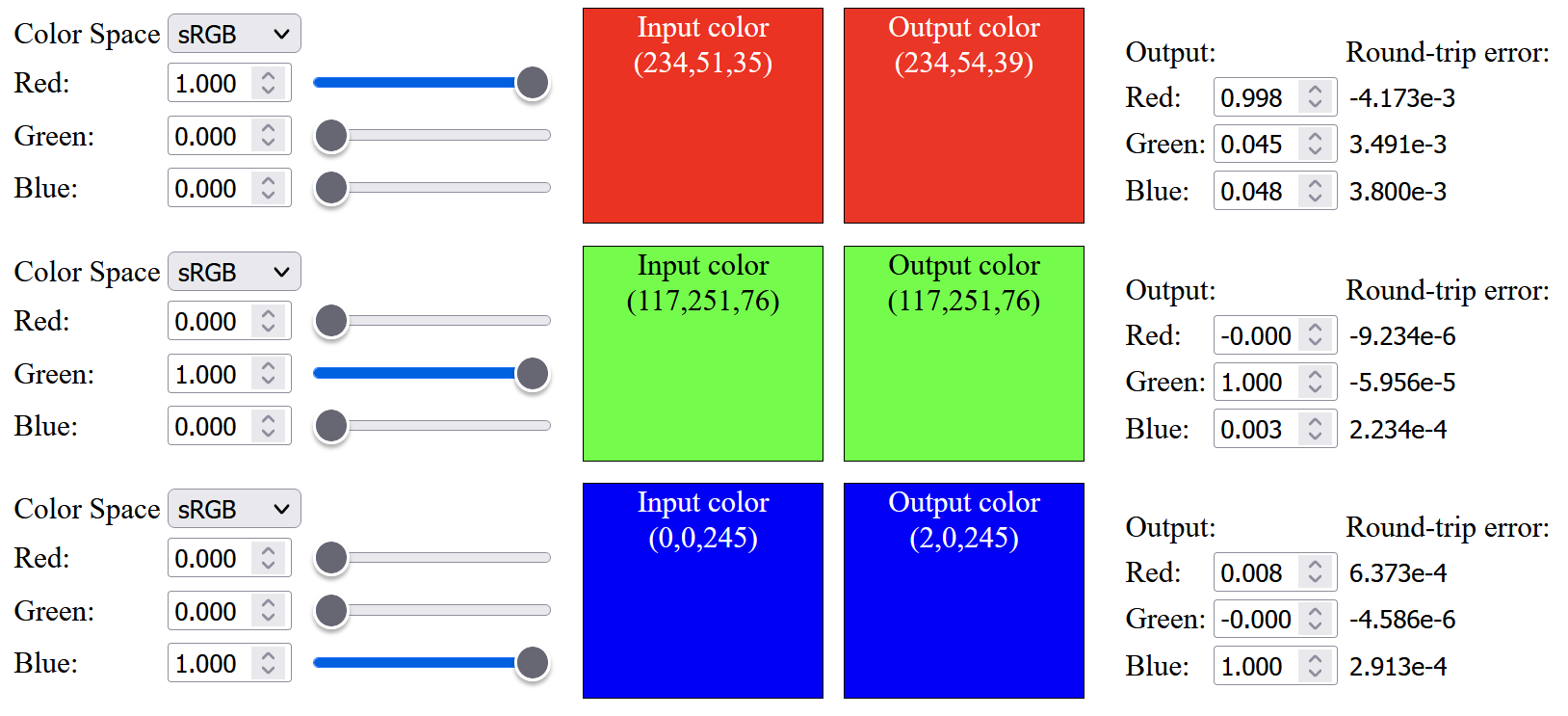
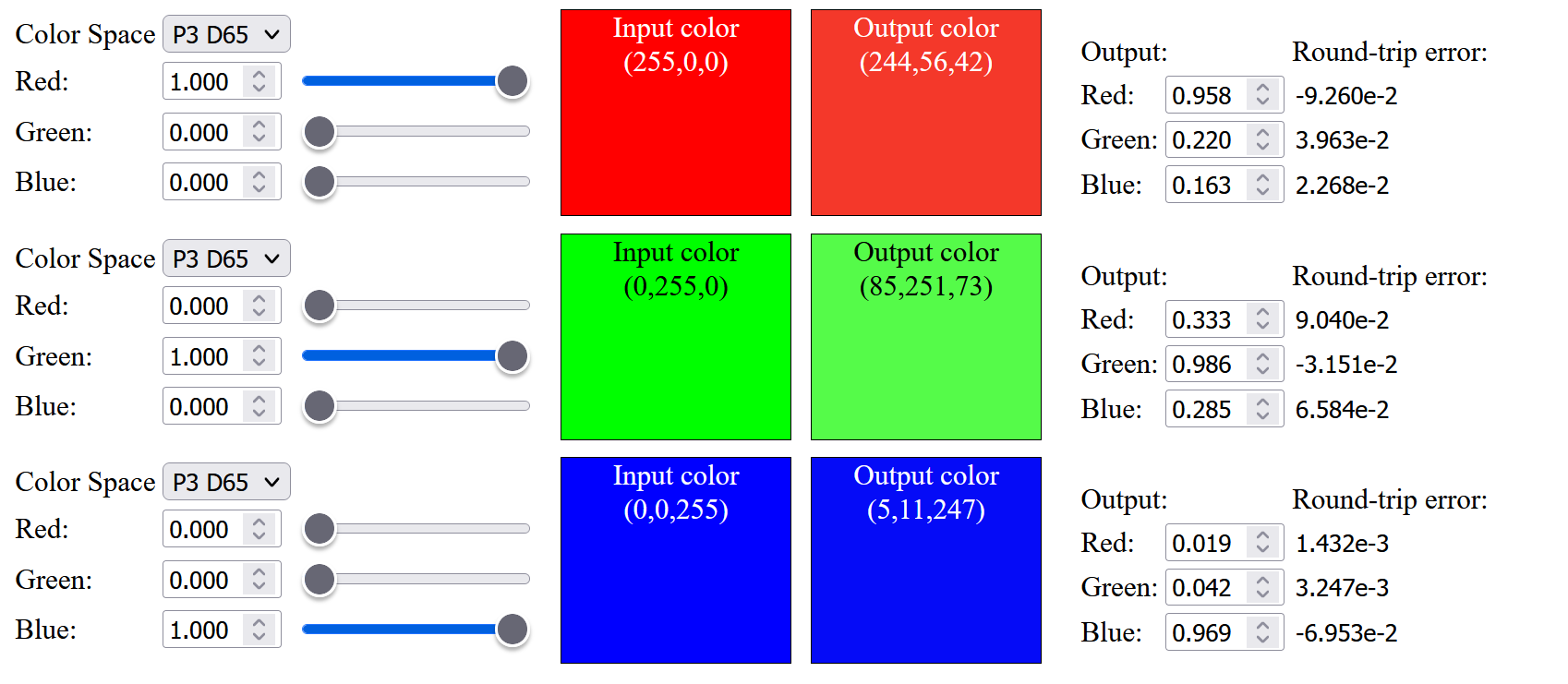
However, for those saturated Display-P3 color, we still cannot up sample them exactly, and can only achieve slightly more saturated color compared to sRGB color:

The up-sampled saturated red is having a visible difference from the original color before up-sampling, I have tried to modify the objective function to only optimize the Red basis function (ignoring the Green and Blue basis functions), and still cannot get an exact up-sampled saturated red from a D65 light source. May be it is impossible to produce the most saturated Display-P3 red with a D65 light source without violating the physical constraint.

Out of curiosity, I tried to plot the chromaticity diagram of the up-sampled color. The result shows that, using limited [0, 1] range, the up-sampling process can produce "more color" (but not accurate, e.g. red color will be up-sampled to "orange-red"), while using relaxed constraint will reduce the up-sampled color gamut.

Chromaticity diagram of up-sampled color using limited [0, 1] range
Chromaticity diagram of up-sampled color using relaxed [-0.1, 1.1] range


CMF Reference White

Up to this point, the calculation for the up-sampled color is using D65 as reference white. But one day, I saw this tweet:

The CMF is using an equal-energy white as its reference white. So I was wondering whether all my calculation was wrong and should add chromatic adaptation after CMF integration.

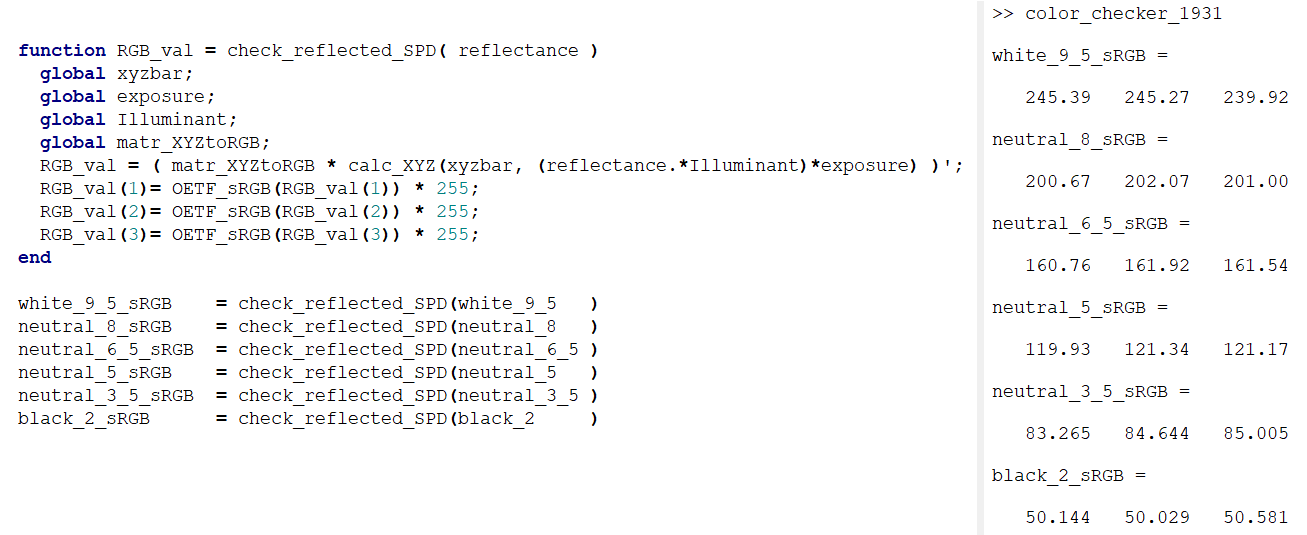
So, I decided to find the spectral reflectance of color checker to integrate with the CMF to verify whether chromatic adaption are needed after CMF integration. Using the color checker data found from here, illuminating those grey patches with D65 and then integrate the result with CMF get the following results:

Illuminating grey patches with D65, integrate with CMF without CAT from Illuminant E
sRGB value of measured Color Checker (2005)

Our computed sRGB value are very similar to the measured data, so it seems like we don't need an extra chromatic adaption to adapt the color from the CMF equal-energy reference white (or please let me know if my maths are incorrect).

Optimizing up sampling function with  Color Checker Data

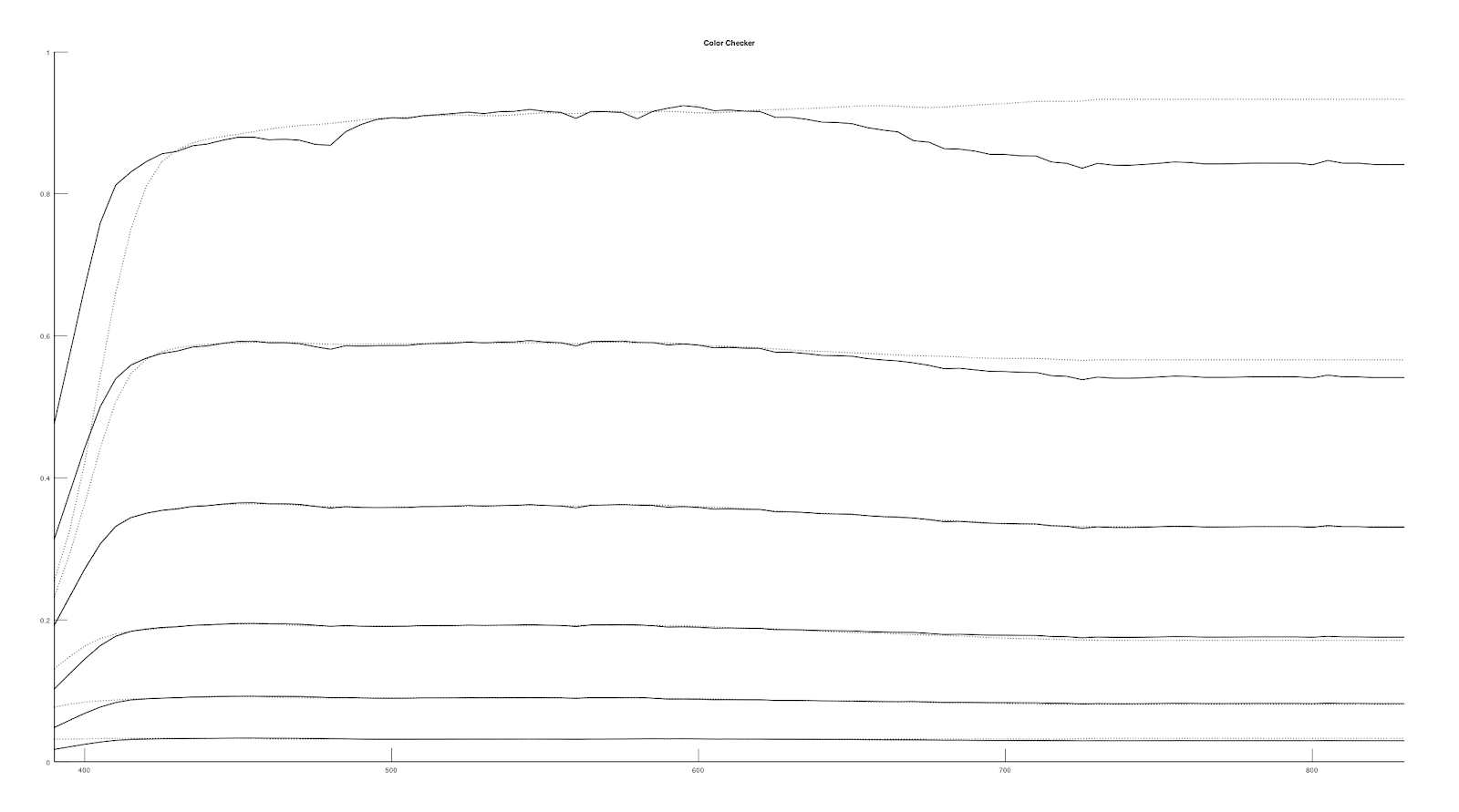
After working with color checker data, I came up with an idea to modify the spectral basis objective function to include a weight to bias it to match with the neutral 6.5 grey patch spectral reflectance data. We can get a decent match for the up-sampled spectral reflectance of color checker grey patches (i.e. white 9.5, neutral 8, neutral 6.5, neutral 5, neutral 3.5, neutral 2).

Spectral Basis computed for Display-P3
Spectral Basis weighted with Neutral 6.5 color checker patch
Up-sampled spectral reflectance of color checker grey patches using Spectral Basis computed for Display-P3
Up-sampled spectral reflectance of color checker grey patches using Spectral Basis weighted with Neutral 6.5 patch data

However, the up-sampled white color will have a slight round-trip error:


Conclusion

In this post, I have ported the original "Spectral Primary Decomposition" source code to Octave, tried to change it to up-sample Display-P3 color, but the result is not very good. Also, within a game engine, we usually have exposure and tone mapping adjustment, which affect the final pixel color. So I was wondering whether the up-sampling method should take those parameters into account. But doing so, the texture color meaning will be different from the PBR albedo texture. So, I will leave it for future investigation.


References

[1] https://graphics.geometrian.com/research/spectral-primaries.html

[2] http://yuhaozhu.com/blog/cmf.html 

[3] https://babelcolor.com/colorchecker-2.htm


Implementing Gamut Mapping

Introduction

Continue with previous post, after learning how gamut clipping works, I want to know how it behaves in rendered image, so I implemented it in my toy path tracer with clipping to arbitrary gamut. It can be downloaded here. Also, the Shadertoy sample is updated to support clipping to arbitrary gamut.

With gamut clipping
Without gamut clipping

Solving max saturation analytically

We need to compute the maximum saturation to perform gamut clipping. In the originally gamut clipping blog post, the author relies on fitting a polynomial function for the sRGB max saturation. But for my path tracer, it can output to different color gamut (e.g. Adobe RGB, P3 D65...), I was too lazy to write such curve fitting function for arbitrary gamut, so I took a look at how the max saturation polynomial function is derived from the original Colab source code:

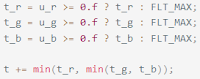
Luckily, when optimizing the e_R() / e_G() / e_B() function to 0, it is equivalent to solving the equation to_R() / to_G() / to_B() = 0, which is a cubic function with analytical solution: 

To calculate max saturation for arbitrary gamut, we can first compute the r_dir / g_dir / b_dir for our target gamut, then compute the Oklab to target gamut matrix, finally we can solve the cubic equation to compute the maximum saturation. Details can be found in the Shadertoy sample code.

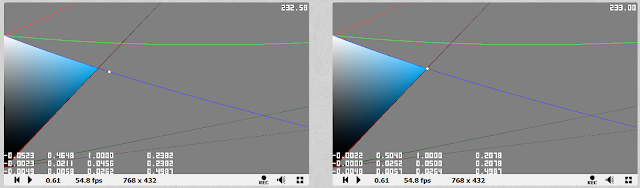
But, solving this cubic equation will have some precision issue at some hue value around the blue color, so the Shadertoy demo perform a step of Halley's method to minimize the issue. If the target clipping gamut is not large (e.g. sRGB, AdobeRGB...) Solving the cubic equation with numerical method (e.g. 1 step of Halley's method + 1 step of Newton's method) using a good initial guess (e.g. I have tried 0.4 in the Shadertoy demo) may be enough and will be more stable numerically.

The left image show the precision error for calculating the cusp point at hue 232.58 degree
The right image can calculate the cusp point correctly with < 1 degree hue difference from left image


Solving RGB=1 clipping line with 2 curves only

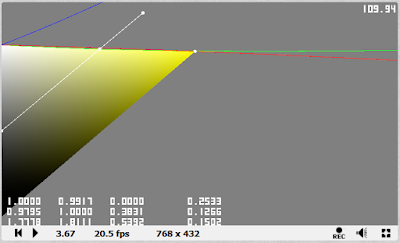
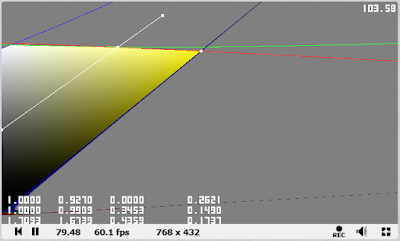
From previous post, we know that the upper clipping line of the valid gamut "triangle" is the line with Red/Green/Blue value = 1, and at most 2 clipping lines are used:

This yellow hue use 2 upper clipping lines (red and green lines)

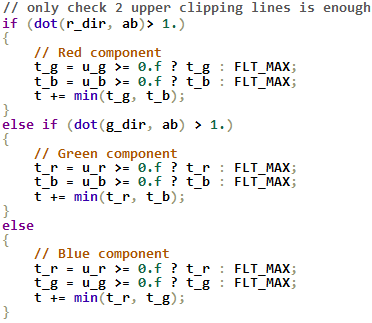
In the updated Shadertoy demo, the upper "triangle" clipping method is changed to use 2 clipping lines depending on the r_dir / g_dir / b_dir (computed during max saturation).

Originally clipping code using all 3 lines
updated clipping code using 2 lines depending on hue

And during my implementation, I accidentally found that when performing gamut clipping for ACEScg color space, I forgot to calculate the chromatic adaptation due to different white point (Oklab uses D65 while ACEScg uses roughly D60), all 3 upper clipping lines need to be used:

All 3 upper clipping lines are used due to chromatic adaption bug

Result

Now, let's see how gamut clipping looks in rendered image. All 5 gamut clipping methods from Björn Ottosson's blog are implemented:

  1. Keep lightness constant, only compress chroma (Chroma clipped)
  2. Projection towards a single point, hue independent (L0=0.5 projection)
  3. Projection towards a single point, hue dependent (L0=Lcusp projection)
  4. Adaptive L0, hue independent (Adaptive L0=0.5)
  5. Adaptive L0, hue dependent (Adaptive L0=Lcusp)

Let's start with a night scene, the clipping effect is most noticeable in the blue curtain and a slight change in the green curtain:

Without gamut clipping
Chroma clipped
Out of gamut pixels
L0=0.5 projection
Adaptive L0=0.5, α=5.0
Adaptive L0=0.5, α=0.05
L0=Lcusp projection
Adaptive L0=Lcusp, α=5.0
Adaptive L0=Lcusp, α=0.05

Then the following test scenes all use a light with saturated color (e.g. red color with (1, 0, 0) in Rec2020) to generate out of gamut color. With a saturated magenta colored light, gamut clipping can do a pretty good job at showing the details for the out of gamut area (e.g. around the lion face) 

Without gamut clipping
Chroma clipped
Out of gamut pixels
L0=0.5 projection
Adaptive L0=0.5, α=5.0
Adaptive L0=0.5, α=0.05
L0=Lcusp projection
Adaptive L0=Lcusp, α=5.0
Adaptive L0=Lcusp, α=0.05

Changing to a saturated green light, different clipping methods will change the perceived lighting, especially using projection towards a single point method.

Without gamut clipping
Chroma clipped
Out of gamut pixels
L0=0.5 projection
Adaptive L0=0.5, α=5.0
Adaptive L0=0.5, α=0.05
L0=Lcusp projection
Adaptive L0=Lcusp, α=5.0
Adaptive L0=Lcusp, α=0.05

With a saturated red light, gamut clipping can greatly reduce the orange/yellow hue shift. This reminds me the presentation: "HDR in Call of Duty" and "HDR color grading and display in Frostbite", which talked about some of the VFX (e.g. fire/explosion) may relies on such hue shift. I don't know whether it is good or not, but gamut clipping may at least give a closer look between sRGB display and HDR display...

Without gamut clipping
Chroma clipped
Out of gamut pixels
L0=0.5 projection
Adaptive L0=0.5, α=5.0
Adaptive L0=0.5, α=0.05
L0=Lcusp projection
Adaptive L0=Lcusp, α=5.0
Adaptive L0=Lcusp, α=0.05

As gamut clipping can reduce hue shift for the saturated red color, I was wondering whether it can fix hue shift with blue colored light (in sRGB) showing purple which described in DXR Path Tracer post before. Unfortunately, gamut clipping can't fix this... I guess this may need to be fixed earlier in the pipeline (e.g. in tone mapper or use other gamut mapping method)...

Without gamut clipping
With gamut clipping
Out of gamut pixels

Lastly, a scene with not much saturated color, but overexposure is tested. Gamut clipping doesn't change the image much: 

Without gamut clipping
With gamut clipping
Out of gamut pixels

Conclusion

In this post, an analytical solution is provided to perform gamut clipping for different gamut other than sRGB. Also different gamut clipping method are tested. "Compress chroma only" looks quite decent, while projection towards single point may change the perceived lightness of the image (depends on the lighting set up), while the adaptive method using small alpha value (e.g. 0.05) will behave similar to compress chroma only method, while with large alpha (e.g. >5.0), it will behave similar to the projection towards single point method. The demo can be downloaded to play around with different gamut clipping method. Note that the demo relies on a saturated light color to generate out of gamut color and all the albedo textures are in sRGB (due to the texture spectral up-sampling method only support sRGB while light color is using a different spectral up-sampling method). Also, my demo performs the gamut clipping before blending with UI as all the UI are in sRGB color space, in the future, I may need to think about whether the UI should be gamut clipped if wide color are used...

References

[1] https://bottosson.github.io/posts/gamutclipping/

[2] https://www.ea.com/frostbite/news/high-dynamic-range-color-grading-and-display-in-frostbite

[3] https://research.activision.com/publications/archives/hdr-in-call-of-duty